To pull in Retrieval Augmented Generation (RAG) data into your prompts and Agentforce Agents you might want to connect Amazon S3 to Data Cloud to ingest that data.
Here are the steps to create an Amazon S3 connection in Data Cloud using the Coral Cloud Resorts S3 Bucket:
Step I: Access Data Cloud Setup

(1) In Salesforce click on the gear icon in the upper right hand corner.
(2) Select Data Cloud Setup.
Step II: Create a new Connector
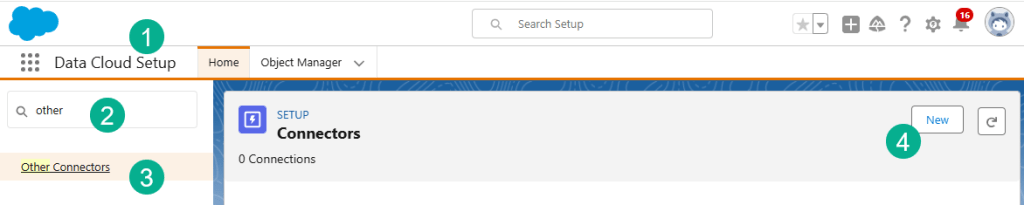
(1) In Data Cloud Setup.
(2) In the search bar type in “other”.
(3) Select Other Connectors.
(4) Click New.

(1) Select Amazon S3.
(2) Click Next.
Step III: Configure the Amazon S3 Connection
Use the details as follows:
| Field | Value |
| Connection Name | Coral Cloud Resorts S3 Connection |
| Connection API Name | Keep default |
| Authentication Option | Access Key/Secret Based (default) |
| AWS access key | AKIA47CRZ7L5P7VBV3LD |
| AWS secret access key | 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 |
| Bucket Name | coral-cloud |
| Parent Directory | Keep default value: / |
Step IV: Test Connection

(1) Verify all the information was filled out correctly.
(2) Click Test Connection.
(3) If it worked you should see a success message.
(4) Click Save.
You should now have an Amazon S3 Connection.

 Let's learn AgentForce Together!