Welcome back to the walkthrough of the Apex for Agentforce Superbadge. In exercise number 2 you will be using Apex to automate how Coral Cloud resorts gathers, processes and stores guest experience reviews.
Step 1: Navigate to the GuestReviewProcessor class in Developer Console
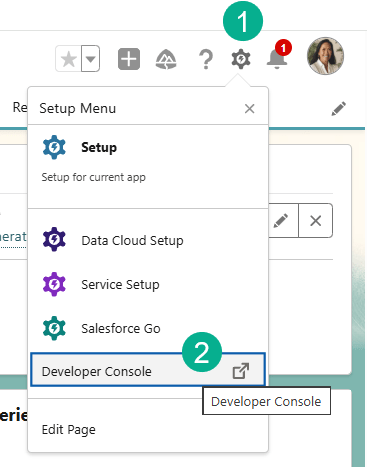
(1) Click on the gear icon in the upper right corner.
(2) Select the Developer Console.
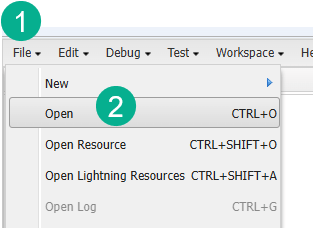
(1) Select File.
(2) And Open.

(1) Make sure Classes are selected.
(2) Search for Guest.
(3) Double click on GuestReviewProcessor.
Step 2: Build out input/output wrapper classes making them invocable
Next we’ll want to make specific classes invocable so that they can be called by Agentforce in a flow. InvocableVariable marks the property as a field flow users can populate in the UI.
First up the GuestReviewRequest class and the Contact value.

(1) In the GuestReviewRequest class.
(2) Enter the following invocable variable:
@InvocableVariable(required=true label=’Contact’ description=’The contact who submits the review’)
Next we do the same for the Experience value.

Here’s the code: @InvocableVariable(required=true label=’Experience’ description=’Experience who submits the review’)
Don’t forget to save along the way.
Next we do the same for the Review value.

Here’s the code: @InvocableVariable(required=true label=’Review’ description=’Description provided by guest’)
Next we continue with the Rating value.
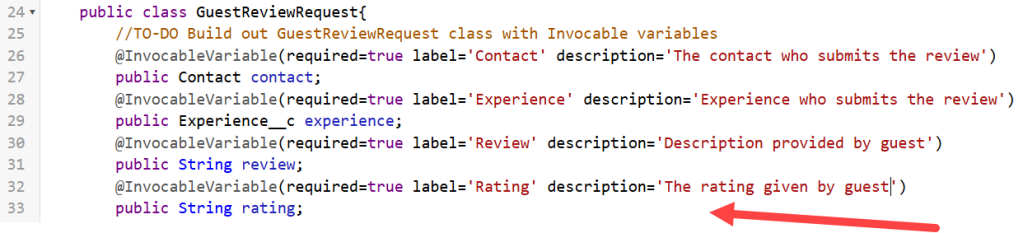
Here’s the code: @InvocableVariable(required=true label=’Rating’ description=’The rating given by guest’)
And last we want to make the Message variable under the GuestReviewResponse class Invocable:

Here’s the code: @InvocableVariable(label=’Status’ description=’Status of the review’)
Step 3: Build an invocable method called ProcessReviews
First make the Process Guest Reviews variable invocable.

Here’s the code: @InvocableVariable(label=’Process Guest Reviews’ description=’Processes guest experience reviews’)
Next you want to make sure you capture the information from the chat to create the guest review record.

(1) Part of the Invocable exercise except this uses the InvocableMethod not Invocable Variable due to this being an action not a data point.
(2) You’ll need to create a list to store the responses of each request.
(3) And a list to store all the Guest Reviews before the bulk insert.
(4) We are creating a for loop here to cycle through all of the requests.
(5) Each type through the loop we’ll create a new guest record.
(6) Map the fields for that record.
(7) Add the list to the reviewslist list that was created above appending the new record. We also have a try/catch starting here for error reporting on line 28.
(8) Then prepare the bulk insert.
(9) We have another loop based on the number of requests.
(10) If the result is successful pass a success message. If not pass a failure message.
(11) Add all responses to the responses variable. And don’t forget to end your try/catch.
(12) Return all of the responses back to the flow.
Here’s the code for validation:
public class GuestReviewProcessor
{
@InvocableMethod(label='Process Guest Reviews' description='Processes guest experience reviews')
public static List processReviews(List requests)
{
List responses = new List();

List<Guest_Review__c> reviewsList = new List<Guest_Review__c>();
    for (GuestReviewRequest request : requests)
    {
        Guest_Review__c experienceRecord = new Guest_Review__c();

        experienceRecord.Contact__c = request.contact.Id;
        experienceRecord.Experience__c = request.experience.Id;
        experienceRecord.Rating__c = request.rating;
        experienceRecord.Comments__c = request.review;

        reviewsList.add(experienceRecord);
    }
    try
    {

        Database.SaveResult[] results = Database.insert(reviewsList,false);
        for(Integer i = 0; i<requests.size();i++)
        {
            GuestReviewResponse response = new GuestReviewResponse();


            if(results[i].isSuccess())
            {
                response.message = 'Guest review successfully processed';
            }
            else
            {
                response.message = 'Failed to process';
            }
            responses.add(response);
        }
    }
    catch(Exception ex)
    {

    }
    return responses;
}
Save your class and try to see if you can complete the challenge:


Next up Exercise 3 in the Apex Superbadge.
Interested in building a Proof of Concept of an Agent, we can help. Sign up for a free discovery session to build your first Agent. https://howtoagentforce.com/agentforce-agent-poc/
 Let's learn AgentForce Together!